
Krisp Review 2026: Is This AI Meeting Assistant Worth It?
Krisp is different from many AI meeting assistants because it combines meeting intelligence with its established audio and noise-cancellation capabilities. Most tools in this category start with the transcript. Krisp starts with the audio itself.
This review asks one practical question: is Krisp worth considering if you want both cleaner meeting audio and AI-powered meeting notes in one workflow? Our research focused on freelancers, consultants, remote professionals and small teams who spend a large part of their week on client calls.
Krisp
- Starting price
- Free plan, paid from $8/user/mo billed annually
- Best for
- Freelancers and small teams that want cleaner calls alongside transcription and AI meeting features.
- Free plan
- Yes: 7-day premium trial plus a continuing limited Free plan
Krisp at a Glance
| Overall ConfidencePilot rating | 4.2 / 5 |
| Review type | Research-based review |
| Best known for | AI noise cancellation + meeting intelligence |
| Best for | Freelancers and small teams that want cleaner calls alongside transcription and AI meeting features |
| Starting paid price | $8/user/month effective monthly price with annual billing ($16/user/month billed monthly) |
| Free option | 7-day premium trial + continuing limited Free plan |
- Overall ConfidencePilot rating
- 4.2 / 5
- Review type
- Research-based review
- Best known for
- AI noise cancellation + meeting intelligence
- Best for
- Freelancers and small teams that want cleaner calls alongside transcription and AI meeting features
- Starting paid price
- $8/user/month effective monthly price with annual billing ($16/user/month billed monthly)
- Free option
- 7-day premium trial + continuing limited Free plan
ConfidencePilot rating based on product research, documented features, pricing, limitations and available third-party feedback. No hands-on testing was conducted for this review.
What Is Krisp?
Krisp first became known as an AI noise-cancellation app that sits between your microphone and your meeting software. It filters background sound from your side of the call and, where enabled, from the other participants' audio before it reaches you.
Over time, Krisp has added a full meeting-intelligence layer on top of that audio foundation. According to Krisp's current product documentation, the platform now covers meeting recording, transcription, AI meeting notes, summaries, action items, AI Chat and integrations with automation and business tools.
That makes Krisp harder to categorize than a typical notetaker. It is not simply a transcription tool, and it is not only an audio utility. Our research found that its real proposition is the combination: the same app that cleans up what you and your client hear is also the one capturing and summarizing the conversation.
For someone on several client calls a day, that combination matters. Background noise affects how professional you sound, and it can also affect how clean the resulting transcript is. Handling both in one place reduces the number of tools running during a call and the number of places where meeting information lives afterwards.
Krisp's Noise Cancellation
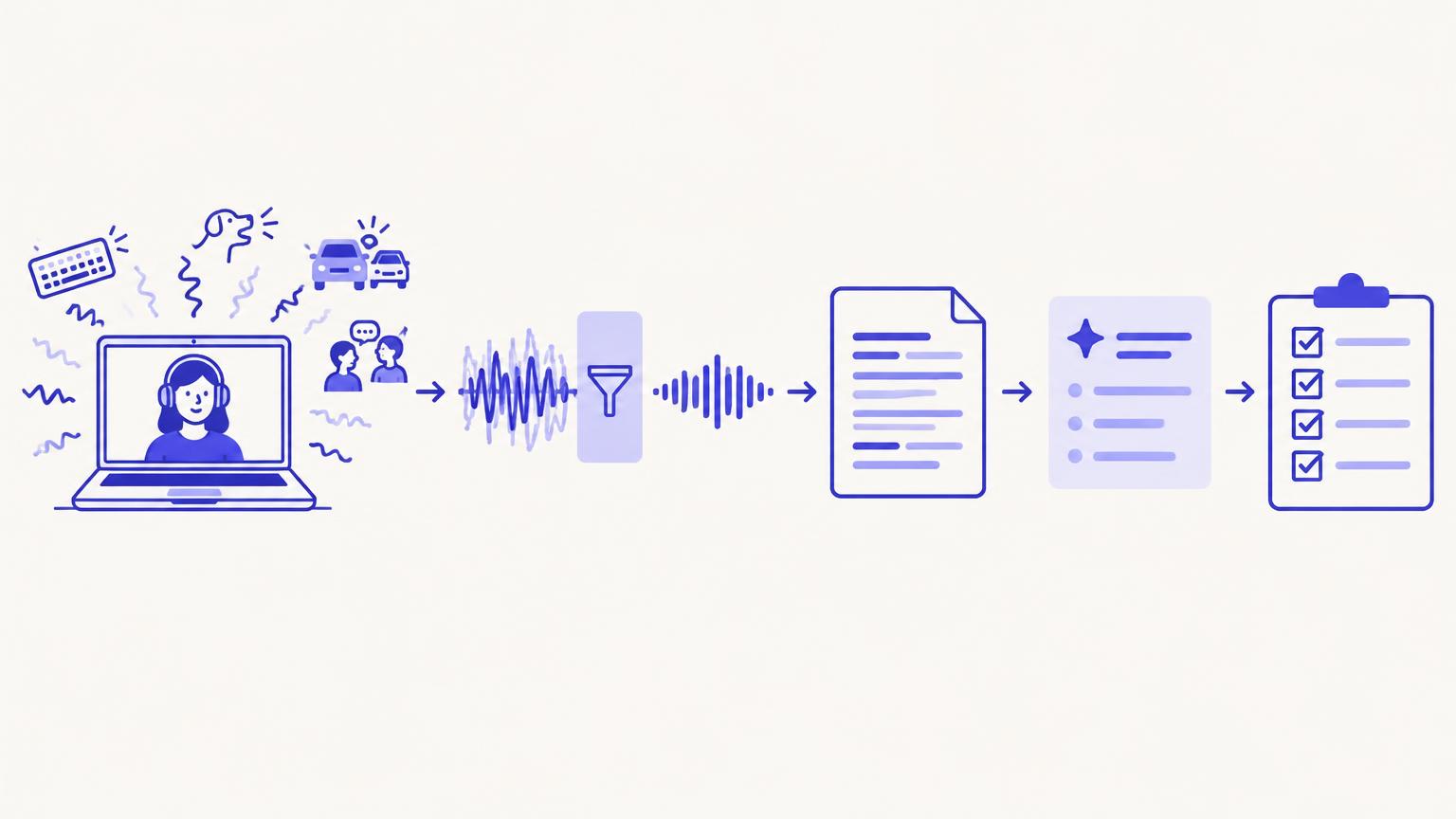
Noise cancellation remains the part of Krisp most people recognize, and it deserves attention because it is where Krisp differs most from other AI meeting assistants.
How it works in practice
Krisp describes its technology as AI-based background noise suppression that separates human voice from surrounding sound in real time. It works as a virtual microphone and speaker, so it can sit underneath supported meeting and calling apps rather than inside one specific platform.
- Background noise suppression: Krisp states that it reduces sounds such as keyboard typing, household noise, traffic, barking dogs and office chatter.
- Background voice handling: Krisp documents features aimed at reducing other voices near the speaker, which is relevant in shared spaces.
- Echo reduction: Krisp describes echo and room-reverberation reduction where supported by the user's setup.
- Voice and audio enhancement: Krisp positions its audio processing as making the speaker's voice clearer, not only quieter background.
- Two-way filtering: noise can be reduced on the outgoing microphone signal and on incoming audio from other participants.
No noise-cancellation tool removes every type of sound in every environment. Results depend on the microphone, the kind of noise, the room and how close the noise source is to the speaker. Third-party reviews generally describe Krisp's noise suppression positively, but we have not measured its performance ourselves.
Who benefits most
- Freelancers working from home with children, pets, deliveries or building noise.
- Consultants who want to sound consistently professional on paid calls.
- Remote workers in apartments or on busy streets.
- People in shared spaces such as coworking offices, cafés or open-plan rooms.
- Travellers taking client calls from hotels, airports or trains.
Krisp as an AI Meeting Assistant
Krisp's AI Meeting Assistant adds recording, transcription and AI-generated notes to the audio layer. According to Krisp, the assistant can capture meetings, produce transcripts, generate summaries and action items, keep recordings, and let users ask questions about meeting content through AI Chat.
The documented feature set also includes multilingual transcription, speaker-related functionality such as speaker labeling, and a meeting history where past conversations can be reviewed and searched.
It is more useful to think about these features as a single workflow than as a list:
Meeting → cleaner audio → recording and transcription → AI summary → action items → follow-up or automated workflow
Each step feeds the next. Cleaner audio gives the transcription a better input, the transcript gives the summary something to work from, and the action items become the starting point for follow-up emails, tasks or automations.
Transcription and AI Meeting Notes
Krisp provides meeting transcription and AI meeting notes that include summaries and action items. According to Krisp, transcription is multilingual, and the paid plans include unlimited transcription.
- Supported languages: Krisp states that its transcription supports multiple languages. The current list should be confirmed on Krisp's website, because language support changes over time.
- AI summaries and action items: generated after the meeting from the transcript.
- Note generation: Krisp's AI Meeting Notes turn a conversation into structured notes.
- Speaker identification: Krisp documents speaker-related functionality; how well it separates speakers depends on the capture method and the call.
- Limits by plan: the continuing Free plan limits AI Meeting Notes to 2 per day, while paid plans remove the main transcription and recording limits.
- Storage: Core includes 10 GB and Advanced includes 60 GB. Enterprise retention options are custom.
We have not included an accuracy percentage because we did not measure one. Transcription quality varies with accents, audio quality, crosstalk and vocabulary, and any accuracy figure published by a vendor should be read as a vendor claim.
Recording and Meeting Capture
Krisp captures meetings in more than one way, and the options are worth understanding before choosing a plan.
- Desktop app: Krisp's desktop application runs on the user's computer and works alongside meeting and calling apps. This is where the noise cancellation lives.
- Bot-based recording: according to Krisp's current plan information, paid plans include a meeting bot that can join calls to record them.
- Audio and video recording: paid plans include audio recording, and Core and above list video recording.
- Mobile access: Krisp lists mobile access on its paid plans for reviewing meeting content.
- Supported platforms: Krisp states that it works with common meeting platforms including Zoom, Google Meet and Microsoft Teams, as well as other calling apps through its virtual audio device.
Capture methods do not behave identically on every device or platform. Check Krisp's current documentation for your operating system and meeting app before relying on a specific recording method.
AI Chat and Meeting Intelligence
Krisp's AI Chat lets users ask questions about their meeting content. According to Krisp, this can be used to retrieve information from past meetings and work with meeting content without rereading full transcripts.
For a freelancer, that could help answer questions such as what a client agreed to on a previous call or which deadlines were mentioned. These are illustrative examples of the kind of task AI Chat is designed for, not results we have tested.
The quality of AI Chat answers depends on the underlying transcripts and on how the AI interprets them, so important details are still worth checking against the transcript or recording.
Integrations and Workflows
Integrations are where Krisp's plan tiers differ most clearly.
| Plan | Documented integrations |
|---|---|
| Core | Zapier, MCP |
| Advanced | Everything in Core, plus Salesforce and ConnectWise |
| Enterprise | Custom; confirm specific integrations and deployment options with Krisp |
Zapier connects Krisp meeting output to thousands of other apps, which is often enough for a freelancer to send summaries or action items to a notes app, task manager or email. MCP support allows compatible AI tools and assistants to work with Krisp meeting data.
A typical workflow looks like this:
Meeting → transcript → summary and action items → automation → downstream business workflow
It is also important to be clear about what Krisp is not. It is not a full CRM or project-management platform. It can feed those systems through integrations, but client records, pipelines and project tracking still live in other tools. If deep CRM workflows are the priority, see our HubSpot CRM review or a meeting tool with more built-in CRM automation, such as the options covered in our MeetGeek review.
Krisp Pricing (September 2026)
| Plan | Billed monthly | Billed annually | Highlights |
|---|---|---|---|
| Free trial | $0 for 7 days | Not applicable | Temporary access to premium features |
| Core | $16/user/month | $8/user/month effective (paid annually) | Unlimited noise cancellation, transcription and audio recording, AI notes, video recording, AI Chat, bot recording, 10 GB storage, Zapier, MCP |
| Advanced | $30/user/month | $15/user/month effective (paid annually) | 60 GB storage, expanded accent conversion, advanced admin, manager view, Salesforce, ConnectWise |
| Enterprise | Custom | Custom | SSO/SCIM, custom retention and security, dedicated support, enterprise deployment |
The $8 and $15 figures are effective monthly rates that require paying for a full year upfront. On month-to-month billing, Core costs $16/user/month and Advanced costs $30/user/month.
Core
- Unlimited noise cancellation
- Unlimited transcription and audio recording
- AI summaries and action items
- Video recording
- AI Meeting Assistant and AI Chat
- Bot-based recording
- Mobile access
- Multilingual transcription
- 10 GB storage
- Zapier and MCP
Advanced
- 60 GB storage
- Increased speaker-side accent conversion allowance
- Unlimited listener-side accent conversion
- Advanced administration and manager view
- Company deal grouping
- Salesforce and ConnectWise integrations
- Expanded collaboration and workflow functionality
Enterprise
Enterprise pricing is custom. Krisp's enterprise documentation describes advanced administration, SSO/SCIM, custom retention and security options, dedicated support and enterprise deployment options. Exact availability of specific enterprise features should be confirmed with Krisp's sales team.
Krisp Free Plan
Krisp offers two different free options, and they are easy to confuse:
- 7-day premium trial: temporary access to paid features, after which the account moves to a paid plan or back to Free.
- Continuing Free plan: an ongoing limited plan with no time limit.
Our research found that the continuing Free plan includes:
- 60 minutes of noise-free audio per day
- 2 AI Meeting Notes per day
- Unlimited transcription, according to the Krisp Help Center
- Up to 5 uploaded files in total
- One active device at a time
For a freelancer with one or two client calls a day, the Free plan can realistically cover noise cancellation on those calls and notes for the most important meetings. Someone on back-to-back calls, or who works across several devices, is likely to reach the limits quickly.
Privacy and Security
Krisp publishes information about how it handles data. The points below summarize what Krisp states; ConfidencePilot has not independently audited Krisp's security.
- On-device audio processing: Krisp states that its noise cancellation processes audio locally on the device.
- Data handling and encryption: Krisp describes encryption of stored and transmitted data in its security documentation.
- Retention: Krisp's enterprise documentation describes custom retention options.
- Compliance: Krisp lists security and compliance credentials on its website; check its trust documentation for the current list.
- Private transcription and HIPAA/BAA: Krisp's enterprise documentation describes private or on-device transcription options and HIPAA-related capabilities, including BAAs, for eligible enterprise customers.
- Enterprise controls: SSO/SCIM and deployment options are described for Enterprise.
If you handle sensitive client information, review Krisp's current security and privacy documentation and confirm what applies to your plan before recording client calls.
Krisp for Freelancers
Krisp's combined approach is most relevant to people whose income depends on calls. For many freelancers, the time after a meeting (writing up notes, confirming next steps, sending a recap) is as important as the meeting itself.
A freelancer working from home may benefit from combining cleaner audio + meeting transcription + AI summary + action items. The client hears a clearer voice, and the freelancer leaves the call with notes and a task list instead of a blank page.
| Role | Where Krisp may help |
|---|---|
| Consultants | Clear audio on paid sessions, summaries of recommendations and agreed next steps |
| Freelance marketers | Capturing campaign feedback and briefs from client calls |
| Writers | Transcripts of interviews and briefing calls for reference |
| Designers | Recording feedback rounds and turning them into revision lists |
| Developers | Summaries of scoping and requirements calls |
| Coaches | Clean audio for sessions and notes on client goals, subject to client consent |
| Recruiters | Notes from candidate and client calls in noisy environments |
| Agencies | Consistent meeting notes across a small team; Advanced adds admin features |
| Virtual assistants | Action items from calls with multiple clients |
| Remote professionals | Professional audio from shared or unpredictable spaces |
When Krisp may not be the best fit
If you already have a quiet workspace and a good microphone, Krisp's biggest differentiator matters less. A freelancer who only wants transcripts and summaries may find a dedicated notetaker such as Fathom or Otter.ai simpler. Someone who wants to avoid meeting bots entirely may prefer tools covered in our Granola review or Bluedot review.
Pros and Cons
Pros
- Strong noise-cancellation heritage that most meeting assistants do not offer
- Meeting intelligence beyond basic transcription
- AI summaries and action items
- AI Chat across meeting content
- Multilingual transcription
- A useful continuing Free plan, separate from the trial
- Zapier and MCP connectivity from the Core plan
- Mobile access on paid plans
Cons
- The lower advertised prices require annual billing
- Salesforce and ConnectWise are limited to Advanced and above
- Storage differs significantly between plans
- Some enterprise features require a sales conversation
- May be more than needed for simple transcription
- Exact quotas for some AI and meeting features may require confirmation with Krisp
Who Should Consider Krisp?
- Freelancers who spend a lot of time on calls
- Remote professionals dealing with noisy environments
- Consultants who need meeting summaries and action items
- Small teams wanting meeting intelligence plus audio enhancement
- People who want both transcription and noise cancellation in one app
Who Might Prefer Another Tool?
Another product may make more sense if your main need is:
- Deep CRM workflows: a meeting platform with built-in CRM updates, or a dedicated CRM.
- Extensive meeting automation: tools centered on configurable post-meeting workflows.
- Collaborative meeting management: platforms built around shared agendas and team notes, such as those in our Fellow review.
- Highly specialized sales workflows: revenue-intelligence tools designed for sales teams.
- A bot-free-first workflow: tools designed primarily around local capture without a meeting participant.
- A lightweight transcript-only solution: a simpler notetaker with fewer features to manage.
Krisp vs Other AI Meeting Assistants
This table is not a ranking. It summarizes positioning based on ConfidencePilot's published reviews. Tools we have not reviewed are marked accordingly rather than filled in with unverified details.
| Tool | Core positioning | Built-in noise cancellation | Best suited use case |
|---|---|---|---|
| Krisp | Audio enhancement + meeting intelligence | Yes, core feature | Calls in noisy environments that also need notes |
| Fireflies AI | Meeting transcription, search and integrations | Not a core feature | Searchable meeting records and team integrations |
| Fathom | AI notetaker with a generous free plan | Not a core feature | Straightforward notes and summaries |
| Otter.ai | Live transcription and notes | Not a core feature | Real-time transcripts |
| MeetGeek | Meeting notes plus workflow and CRM automation | Not a core feature | Automated follow-up workflows |
| Fellow | Meeting management and collaboration | Not a core feature | Team agendas and shared notes |
| tl;dv | Recording, notes and CRM-oriented features | Not a core feature | Recorded calls with highlights |
| Granola | Bot-free AI notepad | Not a core feature | Bot-free personal notes |
| Bluedot | Bot-free and bot-based capture with AI notes | Not a core feature | Flexible capture methods |
| Avoma | Not reviewed by ConfidencePilot | Not reviewed | Confirm with vendor |
| Tactiq | Not reviewed by ConfidencePilot | Not reviewed | Confirm with vendor |
All of the reviewed tools above offer AI transcription and summaries in some form. For a detailed side-by-side of two popular options, see Fireflies vs Fathom, or read our best AI note-takers for freelancers guide.
Is Krisp Worth It in 2026?
The answer depends on what you need from your calls.
Krisp makes particular sense when
- Audio quality and noise cancellation are important to you
- You also need meeting notes and transcription
- You want both capabilities in one workflow rather than two separate tools
A different tool may make more sense when
- Your priority is deep meeting automation
- CRM workflows are the main requirement
- You want a dedicated meeting-management platform
- You only need basic transcription
For a structured way to weigh these trade-offs, see our guide on how to choose an AI meeting assistant for client calls.
ConfidencePilot Rating
| Category | ConfidencePilot score |
|---|---|
| Ease of Use | 4.3/5 |
| Features | 4.4/5 |
| AI Capabilities | 4.2/5 |
| Pricing | 4.1/5 |
| Integrations | 4.0/5 |
| Value for Money | 4.2/5 |
| Freelancer Suitability | 4.5/5 |
| Overall | 4.2/5 |
Krisp scores highest for freelancer suitability because its combination of noise cancellation and meeting notes directly addresses the reality of client calls from home or shared spaces. Its feature set is broad for the price. Integrations score slightly lower because CRM connections sit on the Advanced tier, and pricing is held back by the gap between monthly and annual billing.
This review is based on product documentation, pricing information, independent research and available third-party feedback. ConfidencePilot did not conduct hands-on testing for this review. See our methodology for how we rate software.
Frequently Asked Questions
What is Krisp?
Krisp is an app that combines AI noise cancellation with meeting recording, transcription, AI meeting notes, summaries, action items and AI Chat.
Is Krisp an AI meeting assistant?
Yes. Alongside its noise cancellation, Krisp includes an AI Meeting Assistant that records, transcribes and summarizes meetings.
Does Krisp have a free plan?
Yes. Krisp offers a 7-day premium trial and a separate continuing Free plan with 60 minutes of noise-free audio per day, 2 AI Meeting Notes per day and one active device.
How much does Krisp cost in 2026?
Core costs $16/user/month billed monthly or $8/user/month effective with annual billing. Advanced costs $30/user/month monthly or $15/user/month effective annually. Enterprise is custom.
Does Krisp transcribe meetings?
Yes. Krisp provides multilingual meeting transcription, with unlimited transcription on paid plans.
Does Krisp work with Zoom, Google Meet and Microsoft Teams?
Krisp states that it works with Zoom, Google Meet and Microsoft Teams, along with other calling apps through its virtual audio device.
Is Krisp good for freelancers?
Our research suggests it can be a strong fit for freelancers who take many client calls, especially from noisy or shared environments, and who also want meeting notes.
Does Krisp have noise cancellation?
Yes. AI noise cancellation is Krisp's original and best-known feature, and it is included in every plan with daily limits on Free.
Is Krisp better for audio quality or meeting notes?
Krisp's distinctive strength is audio quality. Its meeting notes are a capable addition, and the main value comes from having both in one workflow.
Is Krisp worth paying for?
It is worth considering if you need both cleaner call audio and AI meeting notes. If you only need transcription, a simpler notetaker may be enough.
Considering Krisp?
Compare the current plans and free options on Krisp's official website before choosing a tier.