
Best AI Meeting Assistants Without a Bot in 2026

A meeting bot that joins as an extra participant can be awkward on a client call. Some clients ask what it is, some organisations block it, and some conversations simply feel more natural without it. This guide compares tools that produce AI meeting notes without a third-party bot joining, and explains what that does and does not mean for compatibility and privacy.
ConfidencePilot has not measured the accuracy of these tools. Features, platform support and prices come from each vendor's official pages and help documentation, checked in October 2026. Prices and plan availability may change.
What does "AI meeting assistant without a bot" mean?
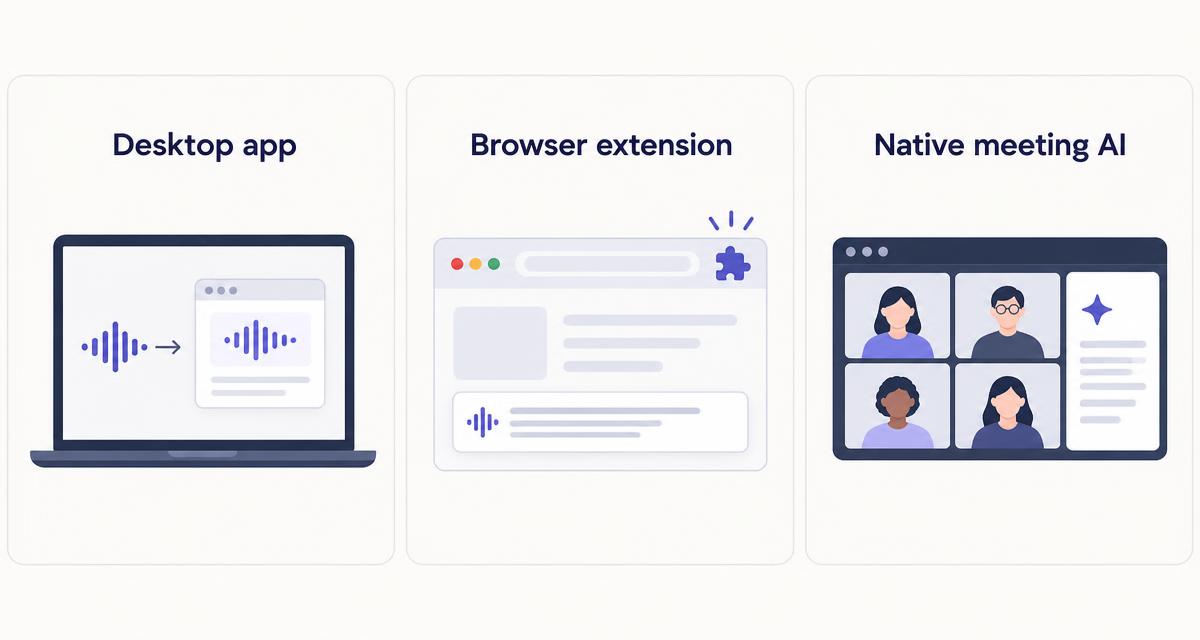
- Bot-free desktop capture: an app on your computer or phone records the audio your device plays and hears. It usually works with any meeting platform, and often with in-person conversations too (Granola, Krisp, Jamie, Bluedot).
- Browser-extension capture: an extension reads the meeting's captions or audio inside the browser. It is easy to install but generally works only for supported platforms joined in the browser (Tactiq, Bluedot).
- Native meeting AI: Zoom, Google Meet and Microsoft Teams offer built-in summaries. No third-party participant joins, but these features depend on your subscription, the host's settings and, often, transcription being switched on.
- Traditional bot-based assistants: tools such as Otter.ai, Fathom and tl;dv can send a bot into the meeting as a visible participant. That is transparent and reliable on supported platforms, but the bot needs to be admitted and some organisations block it. See Fathom vs tl;dv for two bot-based options.
Some tools offer both a bot mode and a bot-free mode. They are not interchangeable: they can differ in platform support, setup and how they appear to other participants. Check the exact capture method for your setup before subscribing.
Best AI meeting assistants without a bot at a glance
| Tool | Capture method | OS or browser | Main strengths | Free plan | Starting price | Best for |
|---|---|---|---|---|---|---|
| Granola | Third-party app: device audio | Mac, Windows, iOS, Android | Notes enhanced from your own typing | Basic (limited history) | $14/user/month (Business) | Overall bot-free notes |
| Krisp | Third-party app: desktop audio (bot optional) | Mac, Windows; mobile app | Noise cancellation plus notes | Free option + 7-day trial | $8/month billed annually; $16 monthly | Noisy calls |
| Jamie | Third-party app: device audio | macOS, Windows, iOS | 100+ advertised languages, in-person | 10 notes/month, 30 min each | $24/month billed annually (Plus) | Multilingual meetings |
| Tactiq | Third-party: browser extension; Mac app | Chrome; Mac app for Zoom desktop only | Quick setup | 10 transcripts/month | $8/user/month billed annually; $12 monthly | Browser-based meetings |
| Bluedot | Third-party: extension or desktop (bot optional) | Browser, desktop, mobile | Many capture options | 5 meetings in total | $14/month billed annually; $18 monthly | Flexible capture |
| Zoom AI Companion | Native platform AI | Zoom apps | Built into Zoom | Not on Zoom's free Basic plan | Requires an eligible paid Zoom Workplace plan | Zoom-only users |
| Google Meet "Take notes for me" | Native platform AI | Google Meet on computer | Notes saved to Google Docs | No | Requires an eligible Workspace edition or Google AI plan | Google Workspace users |
| Teams intelligent recap | Native platform AI | Microsoft Teams | Recap inside Teams | No | Requires Teams Premium or a Microsoft Copilot license | Microsoft 365 users |
The first five are independent third-party apps that work across platforms in different ways. The last three are features of a single meeting platform and only work inside that platform.
Best overall bot-free meeting assistant: Granola
| Capture method | Bot-free device audio from a desktop or mobile app |
| Platforms | Mac, Windows, iOS and Android, according to Granola |
| Meetings | Online calls on any platform that plays through your device, plus in-person conversations |
| Free plan | Basic is free, with limited meeting history |
| Paid pricing | Business $14/user/month. Enterprise from $35/user/month. Billing terms not assumed; check the pricing page |
- Capture method
- Bot-free device audio from a desktop or mobile app
- Platforms
- Mac, Windows, iOS and Android, according to Granola
- Meetings
- Online calls on any platform that plays through your device, plus in-person conversations
- Free plan
- Basic is free, with limited meeting history
- Paid pricing
- Business $14/user/month. Enterprise from $35/user/month. Billing terms not assumed; check the pricing page
Granola captures the audio playing on your device and combines it with the notes you type during the call, then produces an enhanced set of notes afterwards. Because it listens on your device rather than joining the call, nothing new appears in the participant list, and it is not tied to one meeting platform.
Granola documents 10 languages on desktop, and additional languages may be available on iPhone. Integrations such as HubSpot, Affinity, Attio, Notion, Slack and Zapier are listed on the Business plan.
The main drawback for freelancers is that the free Basic plan keeps only limited meeting history, so it works better as a trial than as a long-term archive. Granola is also a personal notes tool first, not a CRM or follow-up platform.
Pros
- Works across meeting platforms without a bot
- Combines your own notes with AI enhancement
- Desktop and mobile apps, including in-person use
Cons
- Free plan has limited meeting history
- Fewer documented desktop languages than some rivals
- Integrations sit on the paid Business plan
Visit Granola or see Granola's current pricing. For more detail, read our Granola review.
Best for noise cancellation and meeting notes: Krisp
| Capture method | Desktop app capturing audio locally; Krisp also offers an optional bot for Zoom, Google Meet and Teams |
| Platforms | Mac and Windows desktop apps; mobile app for in-person recording |
| Strengths | Noise cancellation, transcription, summaries and action items in one app |
| Free plan | Free option plus a 7-day trial of paid features |
| Paid pricing | Core $16/month with monthly billing or $8/month billed annually. Advanced $30 or $15. Enterprise custom |
- Capture method
- Desktop app capturing audio locally; Krisp also offers an optional bot for Zoom, Google Meet and Teams
- Platforms
- Mac and Windows desktop apps; mobile app for in-person recording
- Strengths
- Noise cancellation, transcription, summaries and action items in one app
- Free plan
- Free option plus a 7-day trial of paid features
- Paid pricing
- Core $16/month with monthly billing or $8/month billed annually. Advanced $30 or $15. Enterprise custom
Krisp started as noise cancellation software and now adds AI meeting notes on top. Its desktop app sits between your microphone and your meeting app, which is also how it can capture the conversation without a participant joining.
Krisp also offers a bot for supported platforms. The two modes are not interchangeable: if you want bot-free capture, use the desktop app, and check which mode is active before an important client call.
It makes most sense if you take calls in noisy spaces and want both cleaner audio and notes from one subscription. If you only need notes, a dedicated notes tool may be simpler.
Pros
- Noise cancellation and notes from one desktop app
- Works with most meeting apps on your computer
- Low annual price for the Core plan
Cons
- Bot mode and bot-free mode behave differently
- Monthly billing costs twice the annual rate
- Free option has meaningful limits on AI notes
Read our full Krisp review, or see Krisp's current pricing and its AI note taker page.
Best for flexible or multilingual meetings: Jamie
| Capture method | Bot-free desktop or iPhone app capturing device audio |
| Platforms | macOS, Windows and iOS, according to Jamie |
| Meetings | Online meetings on any platform, plus in-person meetings |
| Languages | Jamie advertises support for 100+ languages |
| Free plan | 10 AI notes a month, 30-minute limit per meeting |
| Paid pricing | Plus from $24/month and Pro from $46/month, billed annually. Jamie's help centre lists US monthly prices of $29 (Plus) and $55 (Pro). Team from $37/seat/month billed annually |
- Capture method
- Bot-free desktop or iPhone app capturing device audio
- Platforms
- macOS, Windows and iOS, according to Jamie
- Meetings
- Online meetings on any platform, plus in-person meetings
- Languages
- Jamie advertises support for 100+ languages
- Free plan
- 10 AI notes a month, 30-minute limit per meeting
- Paid pricing
- Plus from $24/month and Pro from $46/month, billed annually. Jamie's help centre lists US monthly prices of $29 (Plus) and $55 (Pro). Team from $37/seat/month billed annually
Jamie is a European meeting assistant that records from your computer or iPhone instead of joining the call. Its own documentation describes data hosting in the EU, which some freelancers working with European clients will want to know, though you should still review its data processing terms yourself.
Jamie charges one credit per recorded meeting, whatever its length, within each plan's duration limit. According to its help centre, if you exceed your credits or the duration limit, that meeting's notes are locked until you upgrade. On the Free plan, a 30-minute limit means many client calls will not fit.
We have not measured Jamie's accuracy across languages. Its 100+ language figure is a vendor claim.
Pros
- Bot-free capture on desktop and iPhone
- Broad advertised language support
- In-person meetings supported
Cons
- Free plan's 30-minute limit is restrictive
- Notes are locked when you exceed limits
- Pricing differs by currency and billing frequency
Visit Jamie or see Jamie's current pricing.
Best browser-based option: Tactiq
| Capture method | Chrome extension using the meeting's captions in the browser; separate Mac app for Zoom desktop calls |
| Chrome extension | Google Meet, Zoom and Microsoft Teams in the browser |
| Mac app | Zoom desktop calls only, according to Tactiq |
| Free plan | 10 transcripts a month |
| Paid pricing | Pro $8/user/month billed annually or $12 with monthly billing. Team $16.67 annually or $20 monthly |
- Capture method
- Chrome extension using the meeting's captions in the browser; separate Mac app for Zoom desktop calls
- Chrome extension
- Google Meet, Zoom and Microsoft Teams in the browser
- Mac app
- Zoom desktop calls only, according to Tactiq
- Free plan
- 10 transcripts a month
- Paid pricing
- Pro $8/user/month billed annually or $12 with monthly billing. Team $16.67 annually or $20 monthly
Tactiq is the lightest option here. The Chrome extension transcribes meetings you join in the browser and adds AI summaries and action items, without a separate participant joining.
The Mac app is narrower than the extension. Tactiq's download page states that it currently transcribes Zoom desktop calls only, so use the extension for Google Meet and Teams. If you join most calls from desktop apps rather than a browser, Tactiq is less flexible than a desktop recorder.
Tactiq can show participants a notification that a transcript is being taken, and its paid plans let you manage those notifications. Bot-free does not mean unannounced.
Pros
- Quick to install and easy to understand
- Low entry price on annual billing
- Covers the three main platforms in the browser
Cons
- Mac app supports Zoom desktop only
- Works best with browser-based meetings
- Free plan limited to 10 transcripts a month
Visit Tactiq, see Tactiq's plans or download the extension or Mac app.
Best flexible capture option: Bluedot
| Capture method | Bot-free browser extension and desktop capture, plus an optional bot mode |
| Other capture | Mobile, in-person and Apple Watch recording, according to Bluedot |
| Free plan | 5 lifetime meetings |
| Paid pricing | From $14/month billed annually or $18 with monthly billing |
- Capture method
- Bot-free browser extension and desktop capture, plus an optional bot mode
- Other capture
- Mobile, in-person and Apple Watch recording, according to Bluedot
- Free plan
- 5 lifetime meetings
- Paid pricing
- From $14/month billed annually or $18 with monthly billing
Bluedot offers more ways to record than most tools here. You can capture through its browser extension or desktop app without a participant joining, or use a separate bot mode when that suits the meeting better.
As with Krisp, the bot and bot-free modes are different products in practice. Choose the capture method deliberately for each type of meeting rather than assuming Bluedot is always bot-free.
The free plan is a short trial: 5 meetings in total, not per month.
Pros
- Several bot-free capture methods
- Optional bot mode when you want it
- Covers in-person and mobile recording
Cons
- Free plan is 5 meetings in total
- More settings to understand than simpler tools
- Monthly billing costs more than annual
Read our Bluedot review, or see Bluedot's current pricing.
Native meeting AI: Zoom, Google Meet and Microsoft Teams
If nearly all your calls happen on one platform that you already pay for, its built-in AI may be simpler than adding another app. None of these features is universally free or available to every user.
Zoom AI Companion meeting summary
According to Zoom's support documentation, Meeting Summary requires a licensed user on an eligible paid Zoom Workplace plan (Pro, Pro Plus, Business, Business Plus, Enterprise or above). An account owner or admin must enable it, and the host starts it in the meeting. Summaries can be emailed to participants if the host chooses, and the feature is not available in breakout rooms. Zoom also notes that AI features may use third-party models and may not be available in some regions or industries. See Zoom's Meeting Summary guide.
Google Meet "Take notes for me"
Google's help centre says "Take notes for me" requires an eligible Google Workspace edition or Google AI plan, so not every Workspace subscription includes it. It supports eight spoken languages (English, French, German, Italian, Japanese, Korean, Portuguese and Spanish), one language per meeting. Notes are saved to Google Docs and the organiser receives a link afterwards. If host management is on, only hosts can turn it on, and administrators can require participants to consent. See Google's "Take notes for me" guide.
Microsoft Teams intelligent recap
Microsoft's admin documentation states that intelligent recap needs a Microsoft 365 subscription that includes Teams (or a separate Teams license) plus either a Teams Premium license or a Microsoft Copilot license. Transcription must be turned on through meeting policies, and audio recap requires a Copilot license. For scheduled meetings, a recap without saving transcripts is available with a Copilot license. See Microsoft's intelligent recap documentation and the Teams Premium page.
Native features usually run on the host's account. If your client hosts the call on their platform, you may not control whether a summary is created, who receives it or where it is stored.
Desktop apps vs browser extensions vs native meeting AI
| Desktop app | Browser extension | Native meeting AI | |
|---|---|---|---|
| Setup | Install an app and grant audio permissions | Install an extension; quickest to start | Admin or host enables it in settings |
| Platform compatibility | Usually any platform playing through your device | Supported platforms joined in the browser | Only its own platform |
| OS requirements | Specific desktop or mobile OS versions | A supported browser such as Chrome | The platform's own apps |
| Transcripts, summaries, actions | Varies by tool and plan | Varies by tool and plan | Summaries and next steps; transcripts depend on settings |
| Cost and limits | Free tiers with meeting or history limits | Free tiers with transcript limits | Bundled with eligible paid plans or add-on licenses |
| Data handling | Stored with the third-party vendor | Stored with the third-party vendor | Stored in the platform account, under its admin's retention policy |
No method is best for everyone. Desktop apps are the most flexible across platforms, extensions are the simplest to try, and native AI avoids adding a new vendor if your plan already includes it.
How to choose the right tool
- You use several meeting platforms: a desktop app such as Granola, Jamie or Krisp, which captures device audio regardless of platform.
- You mostly use Google Meet: Tactiq's Chrome extension, or "Take notes for me" if your Workspace edition includes it.
- You join Zoom from the desktop app: a desktop recorder, Tactiq's Mac app (Zoom desktop only), or Zoom AI Companion on an eligible paid plan.
- You want noise cancellation as well as notes: Krisp.
- You need in-person meeting notes: Granola, Jamie or Bluedot, which offer mobile or in-person recording.
- You want simple summaries rather than full transcripts: native meeting AI or Granola's notes-first approach.
- You want to minimise retention of client information: check each tool's retention and deletion settings, keep only what you need, and consider native AI inside an account your client already trusts.
For a broader comparison including bot-based tools, see our guide to the best AI note takers for freelancers. If your calls are mainly sales conversations, see the best AI meeting assistants for sales calls.
Privacy, consent and recording client meetings
Bot-free capture is not consent-free recording. A tool that does not appear in the participant list can still record or transcribe what people say, and the rules on telling participants depend on where you and they are located, your clients' policies and your contracts. This is general guidance, not legal advice.
- Tell participants: say at the start of the call that you use an AI notes tool, and stop if anyone objects.
- Check applicable law and client policies: some jurisdictions require all parties to consent to recording, and many clients have their own rules on AI tools.
- Know where data is stored: each vendor stores transcripts and notes on its own servers or yours. Read its data processing terms.
- Check retention and deletion: set the shortest retention that works and delete recordings you no longer need.
- Read model-training disclosures: check whether the vendor uses customer data to train AI models and whether you can opt out.
- Protect confidential information: avoid recording conversations covered by an NDA or sensitive personal data unless your client agrees.
For UK readers, the ICO's guidance on the UK GDPR explains how personal data, including recordings, should be handled. EEA readers can start with the EDPB's guide for small businesses.
Frequently asked questions
Can AI take meeting notes without a bot joining?
Yes. Desktop apps capture audio on your device, browser extensions work within supported meetings in the browser, and Zoom, Google Meet and Teams offer built-in AI summaries on eligible plans.
What is the difference between a bot-free recorder and a meeting bot?
A meeting bot joins the call as a visible participant and records from the platform. A bot-free recorder captures audio or captions on your own device or browser, so no extra participant appears. Platform support and setup differ between the two.
Do bot-free AI meeting assistants work with Zoom and Google Meet?
Most do, but in different ways. Desktop apps generally work with any platform on your device. Tactiq's extension covers Zoom, Meet and Teams in the browser, while its Mac app supports Zoom desktop calls only. Check each tool's documentation for your setup.
Can a desktop app capture calls when headphones are connected?
It depends on the tool, your operating system and your audio settings. Many desktop recorders capture system audio and your microphone separately, but check the vendor's documentation and run a short test call before relying on it.
Are bot-free meeting assistants free?
Several have free plans with limits, such as Tactiq's 10 transcripts a month, Jamie's 10 notes of up to 30 minutes, or Bluedot's 5 meetings in total. Native AI features require eligible paid plans or add-on licenses.
Is recording without a visible bot automatically private or lawful?
No. Whether recording is lawful depends on where participants are and what they agreed to, and privacy depends on how the vendor stores and uses the data. Tell participants and follow your clients' policies.