
Best AI Meeting Assistants for Multilingual Meetings in 2026

If you work with international clients, the question is rarely whether a meeting assistant "supports" your language. It is whether it does the specific job you need: transcribe a call in the language spoken, translate the transcript, write the summary in a different language, or cope when people switch languages halfway through. These are different features, and vendors document them separately.
This guide compares seven tools on those language workflows. ConfidencePilot has not measured the transcription or translation accuracy of these tools. Language support comes from each vendor's official help documentation, checked in October 2026. Prices and plan availability may change. For a broader comparison, see our best AI note takers for freelancers.
What do multilingual AI meeting assistants actually do?
- Transcription in the original language: spoken French becomes French text. This is the baseline, and it usually has the longest language list.
- Transcript translation: an existing French transcript is converted into English text after the call.
- Summaries in a chosen language: the call happens in English, but the summary and action items are written in French.
- Live translated captions: translated text appears while people are still speaking.
- Automatic language detection: the tool identifies the spoken language without you selecting it first.
- Mixed-language transcription: one conversation switches between languages and each part is transcribed correctly.
- Live interpretation: real-time spoken interpretation between participants. None of the tools in this guide is a substitute for a professional interpreter, and translated notes are not the same thing.
A tool that lists 80 or 100 languages for transcription may translate, summarise or handle language switching in far fewer. Always check the language list for the specific feature you plan to use.
Example: a French-speaking designer runs a kickoff call in English with a client in London. She needs an English record for the client and a French summary for herself. That calls for English transcription plus either a summary in a chosen language or transcript translation, not live captions.
Best AI meeting assistants for multilingual meetings at a glance
| Tool | Best for | Transcription languages | Translation and summary capabilities | Mixed-language support | Free plan | Starting price |
|---|---|---|---|---|---|---|
| Notta | Bilingual transcription and translation | 58 | Transcript translation (42); bilingual mode with live translation (23) | Two preselected languages | Yes | $8.17/user/month billed annually |
| Fireflies.ai | Broad language coverage | 100+ | Not documented as standalone transcript translation | Multi-language Mode (beta, 60+); plan not verified | Yes | $10 billed annually; $18 monthly |
| tl;dv | Multilingual transcription | 30+ (standard) | Not documented | Whisper model; plan not verified | Yes | $18/user/month billed annually |
| Fathom | Translated summaries | 38 | Summaries in 6 languages; transcript translation not documented | Not documented | Yes | $16 billed annually; $20 monthly |
| Otter.ai | French-English calls | 6 | Translation on request via Otter Chat | French with English only | Yes | $8.33 billed annually; $16.99 monthly |
| Jamie | Bot-free multilingual notes | 80+ | Summary language set independently | Not documented | 10 notes/month, 30 min | $24/month billed annually |
| Tactiq | Translated transcripts | 30+ (varies by platform) | Translation, summaries and emails in 25+ | Manual language switching | 10 transcripts/month | $8 billed annually; $12 monthly |
Best for bilingual transcription and translation: Notta
| Transcription languages | 58 for monolingual transcription |
| Translation | 42 languages for translating a finished transcript; separate lists for real-time translation |
| Bilingual mode | 23 languages; you choose two before recording, with optional live translation |
| Free plan | Available; check current minute and recording-length limits on Notta's pricing page |
| Starting price | Pro $8.17/user/month billed annually |
- Transcription languages
- 58 for monolingual transcription
- Translation
- 42 languages for translating a finished transcript; separate lists for real-time translation
- Bilingual mode
- 23 languages; you choose two before recording, with optional live translation
- Free plan
- Available; check current minute and recording-length limits on Notta's pricing page
- Starting price
- Pro $8.17/user/month billed annually
According to Notta's help centre, its language support differs by feature, and it documents each one separately: 58 languages for monolingual transcription, 42 for translating a transcript afterwards, and 23 for bilingual transcription and translation. That separation is exactly what a multilingual buyer needs to see, and it is a reminder that the biggest number on a marketing page rarely applies to every feature.
Bilingual mode is the main reason Notta leads this category. You select two languages before an instant recording, an uploaded file or a meeting joined by the Notta Bot (Zoom, Google Meet, Microsoft Teams and Webex), and can switch a live translation on or off during the recording. Notta's help page states that bilingual transcription is available on all plans.
For a French-speaking freelancer running a call in English, the practical workflow is to choose English and French in bilingual mode, or to transcribe in English and translate the transcript into French afterwards. The limitation is that bilingual mode covers only two preselected languages and 23 options in total. A three-language meeting, or a pair outside the list, is not covered by this mode.
Pros
- Language support documented separately for each feature
- Bilingual mode with optional live translation
- Transcript translation into 42 languages
Cons
- Bilingual mode is limited to two preselected languages
- Free-plan limits change; confirm before relying on them
- Translation quality on specialist terms is not documented
Visit Notta or read Notta's language documentation. For more detail, see our Notta review and Notta vs Fathom.
Best for broad language coverage: Fireflies.ai
| Transcription languages | 100+ advertised for standard transcription |
| Mixed-language support | Multi-language Mode (beta), 60+ languages, detects switches in one meeting |
| Auto language detection | Listed as a feature on the pricing page |
| Free plan | Yes, with limited AI summaries |
| Starting price | Pro $10/user/month billed annually, or $18/user/month with monthly billing |
- Transcription languages
- 100+ advertised for standard transcription
- Mixed-language support
- Multi-language Mode (beta), 60+ languages, detects switches in one meeting
- Auto language detection
- Listed as a feature on the pricing page
- Free plan
- Yes, with limited AI summaries
- Starting price
- Pro $10/user/month billed annually, or $18/user/month with monthly billing
Fireflies advertises transcription in more than 100 languages. Its knowledge base describes a separate Multi-language Mode, currently in beta, that detects and transcribes all spoken languages in a single meeting from a list of 60+ languages, including when speakers switch mid-sentence.
Two cautions apply. First, 100+ and 60+ are different lists for different features, so check that your language appears in the Multi-language Mode list if conversations switch languages. Second, Multi-language Mode and auto-language detection appear as separate rows on the Fireflies pricing page, and the plan that includes each can change. We could not confirm from the current documentation whether Multi-language Mode is restricted to Enterprise, so confirm the requirement with Fireflies before buying a plan for this feature.
Pros
- Broadest advertised transcription coverage in this guide
- Documented mid-meeting language switching (beta)
- Mature integrations for follow-up work
Cons
- Multi-language Mode is labelled beta
- Plan required for Multi-language Mode not confirmed
- Translation of transcripts is not clearly documented as a standalone feature
Visit Fireflies or read Fireflies' Multi-language Mode guide. For more detail, see our Fireflies review.
Best for multilingual transcription: tl;dv
| Transcription languages | 30+ with the standard model (with regional variants) |
| Mixed-language support | Premium Whisper model auto-detects the language and handles several languages in one meeting |
| Translation | Not documented as automatic translation of speech |
| Free plan | Yes; Whisper's plan requirement not confirmed |
| Starting price | Pro $18/user/month billed annually |
- Transcription languages
- 30+ with the standard model (with regional variants)
- Mixed-language support
- Premium Whisper model auto-detects the language and handles several languages in one meeting
- Translation
- Not documented as automatic translation of speech
- Free plan
- Yes; Whisper's plan requirement not confirmed
- Starting price
- Pro $18/user/month billed annually
tl;dv documents two transcription models. The default model transcribes in the language you select, from a list of 30+ languages including regional variants such as Portuguese (BR) and Portuguese (PT). The premium Whisper model, according to tl;dv's help centre, auto-detects the spoken language, supports multiple languages spoken in a single meeting and accepts a custom dictionary.
Neither model translates speech. If participants switch between English and French, Whisper aims to transcribe each part in the language spoken, not to convert it all into one language. If your meetings vary in language, tl;dv's preferences include an option to confirm the language setting before each meeting. tl;dv describes Whisper as premium but we could not confirm the exact plan required, so check before relying on it.
Pros
- Documented support for several languages in one meeting (Whisper)
- Custom dictionary for names and technical terms
- Per-meeting language confirmation option
Cons
- Standard model needs the right language selected
- No documented automatic speech translation
- Whisper plan requirement not confirmed
Visit tl;dv or see tl;dv's language page. For more detail, read our tl;dv review.
Best for translated summaries: Fathom
| Transcription languages | 38 |
| Summary translation | Spanish, Portuguese, German, French, Italian and Dutch |
| Transcript translation | Not documented |
| Free plan | Yes |
| Starting price | $16/user/month billed annually, or $20 with monthly billing |
- Transcription languages
- 38
- Summary translation
- Spanish, Portuguese, German, French, Italian and Dutch
- Transcript translation
- Not documented
- Free plan
- Yes
- Starting price
- $16/user/month billed annually, or $20 with monthly billing
Fathom's help centre lists transcripts in 38 languages. Separately, when a call is detected in Spanish, Portuguese, German, French, Italian or Dutch, Fathom automatically translates the summary into that language, sends it in the post-meeting email and shows it by default. Summaries can also be switched between those languages from a drop-down on each call. Fathom's Team Edition documentation describes translating summaries from English into those six languages.
This is summary translation, not transcript translation. An English client call can produce a French summary, but the transcript stays in English. Fathom also states that from October 2026 its new Mac desktop app (Fathom 3.0) supports native-language summaries and translated action items in 38 additional languages, rolling out in phases, so availability may vary by account.
Pros
- Translated summaries delivered automatically by email
- Simple language switch on each call
- Strong Free plan for trying the workflow
Cons
- Summary translation limited to six languages on the documented plans
- No documented full transcript translation
- Expanded Fathom 3.0 language support is Mac-only and rolling out
Visit Fathom or read Fathom's language documentation. For more detail, see our Fathom review and Fathom vs Otter.
Best for French-English calls: Otter.ai
| Transcription languages | English, Spanish, French, German, Japanese, Chinese (Simplified) |
| Mixed-language support | French with English only, when French is the default language |
| Translation | On request through Otter Chat |
| Free plan | Yes, with monthly minute limits |
| Starting price | $8.33/user/month billed annually, or $16.99 with monthly billing |
- Transcription languages
- English, Spanish, French, German, Japanese, Chinese (Simplified)
- Mixed-language support
- French with English only, when French is the default language
- Translation
- On request through Otter Chat
- Free plan
- Yes, with monthly minute limits
- Starting price
- $8.33/user/month billed annually, or $16.99 with monthly billing
Otter supports six transcription languages, with German and Chinese (Simplified) still marked beta. Its help centre states that Otter transcribes in one language at a time, with one documented exception: if you set French as the default language, Otter automatically switches to English when English is detected during the meeting.
That makes Otter a reasonable fit for French-speaking freelancers with English-speaking clients, but only for that pair. It does not apply to Spanish with English, or to any other combination. The selected language also governs the summary, outline and action items. To translate, you can ask Otter Chat to translate a conversation into another language; this is a chat response, not a separately documented translated summary setting.
Pros
- Documented French-English switching
- Translation available on request through Otter Chat
- Familiar live transcription workflow
Cons
- Only six transcription languages
- Mixed-language support limited to French with English
- No documented independent summary-language setting
Visit Otter.ai or read Otter's supported languages. For more detail, see our Otter.ai review.
Best bot-free option for multilingual notes: Jamie
| Capture method | Bot-free desktop and mobile capture of device audio |
| Transcription and summary languages | 80+ documented, plus a list with limited support |
| Summary language | Set independently in Settings, Summary, Summary language |
| Mixed-language support | Not documented |
| Starting price | Plus from $24/month billed annually; Free plan 10 notes/month, 30 min each |
- Capture method
- Bot-free desktop and mobile capture of device audio
- Transcription and summary languages
- 80+ documented, plus a list with limited support
- Summary language
- Set independently in Settings, Summary, Summary language
- Mixed-language support
- Not documented
- Starting price
- Plus from $24/month billed annually; Free plan 10 notes/month, 30 min each
Jamie records from your device rather than sending a bot into the call, so no extra participant appears. Its documentation lists more than 80 languages for transcription and summaries, plus a separate group of languages where quality may vary, and lets you choose a summary language in settings. In practice, that means an English call can produce a French summary.
Jamie does not document full transcript translation or handling of conversations that switch languages, so we do not describe it as supporting either. Pricing pages show different figures in places: plans start from $24/month for Plus billed annually, and Jamie's help centre lists a US monthly price of $29. Privacy and data-processing details should be read on Jamie's own pages before you record client calls.
Pros
- No meeting bot
- Summary language chosen independently of the call
- Broad documented language list
Cons
- Mixed-language meetings not documented
- No documented transcript translation
- Free plan's 30-minute limit is short for client calls
Visit Jamie or read Jamie's language support. See also our guide to AI meeting assistants without a bot.
Best for translated captions and transcripts: Tactiq
| Capture method | Bot-free browser extension; Mac app for Zoom desktop |
| Transcription languages | 30+; list varies by Google Meet, Teams and Zoom |
| Translation | Transcript translation, summaries and emails in 25+ languages |
| Mixed-language support | Language must match the speaker; change it manually when the call switches |
| Starting price | $8/user/month billed annually, or $12 monthly; Free plan 10 transcripts/month |
- Capture method
- Bot-free browser extension; Mac app for Zoom desktop
- Transcription languages
- 30+; list varies by Google Meet, Teams and Zoom
- Translation
- Transcript translation, summaries and emails in 25+ languages
- Mixed-language support
- Language must match the speaker; change it manually when the call switches
- Starting price
- $8/user/month billed annually, or $12 monthly; Free plan 10 transcripts/month
Tactiq transcribes from the meeting's captions inside the browser, so the languages available depend on the meeting platform. Its help centre warns that if the selected language does not match the language being spoken, the transcript may be missing or inaccurate, and explains how to change the transcription language during a meeting.
Tactiq's transcript translator advertises real-time transcript translation into 25+ languages, plus summaries and follow-up emails generated in your preferred language. For a bilingual call, the practical routine is to switch the transcription language when the speaker changes, then translate the transcript or generate the summary in the language your client needs.
Pros
- Real-time transcript translation advertised
- Summaries and emails in a chosen language
- No bot, quick browser setup
Cons
- Manual language switching during mixed-language calls
- Language lists differ by meeting platform
- Depends on browser-based meetings for most capture
Visit Tactiq or read Tactiq's supported languages and transcript translator.
Transcription vs translation vs translated summaries
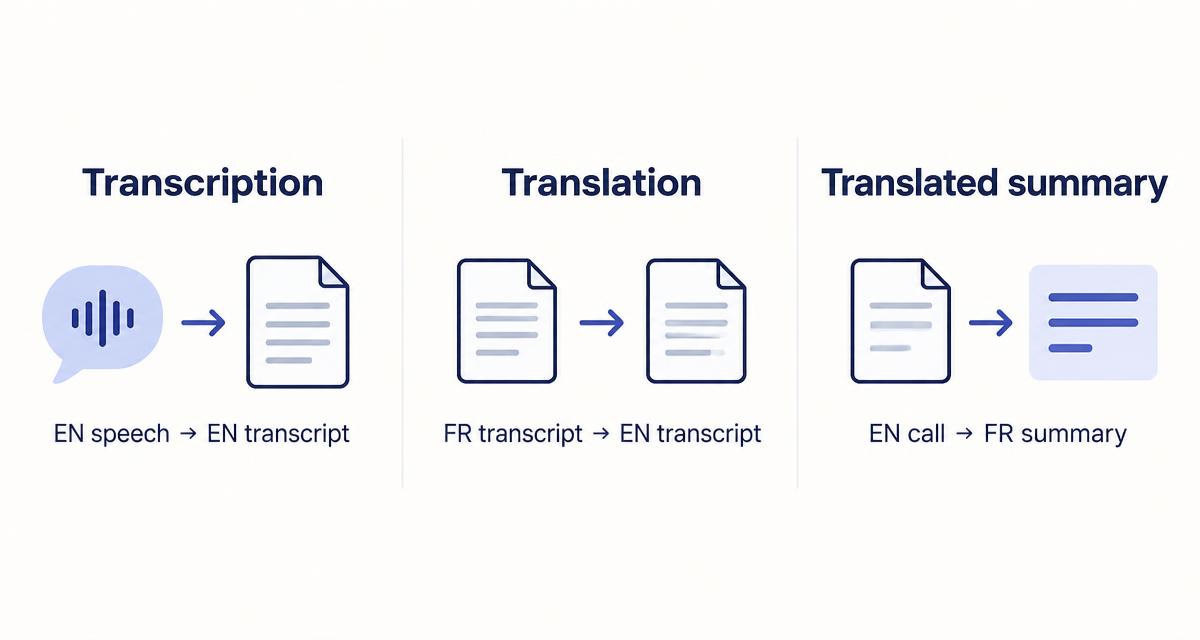
| Capability | Example | What you get | Who needs it |
|---|---|---|---|
| Transcription | English conversation → English transcript | Word-for-word record in the language spoken | Anyone keeping an accurate record of what was said |
| Transcript translation | French transcript → English translation | The full conversation in another language | Sharing a record with a client who reads a different language |
| Translated summary | English call → French summary | Short notes and action items in your language | Freelancers who work in a second language but plan in their first |
| Live translated captions | English speech → French captions | Translated text during the call | Participants who need help following in real time |
These examples describe the capability, not universal product support. Check each tool's section above for the languages and plans that apply.
How to choose the right tool for multilingual client calls
- French-speaking freelancers with English-speaking clients: Otter documents French-English switching when French is the default. Fathom can produce a French summary of an English call. Notta's bilingual mode covers the pair with optional translation.
- Consultants working across several European languages: check each language against the feature list you need. Notta and Fireflies document the widest separate lists; Fathom's summary translation covers six European languages.
- Calls where participants switch languages: Fireflies Multi-language Mode (beta) and tl;dv's Whisper model are the only tools here that document detection of several languages in one meeting. Confirm the plan required before buying.
- Translated summaries rather than live captions: Fathom and Jamie are the simplest routes, because the summary language is set for you or chosen in settings.
- A bot-free workflow: Jamie and Tactiq capture without a bot joining the call. See our guide to AI meeting assistants without a bot.
- Confidential client information: prefer tools with clear retention, deletion and AI-training disclosures, and consider whether the meeting should be recorded at all.
Where a vendor does not document language switching, assume it may not work and test with a non-sensitive call first. For negotiations, legal discussions or anything where nuance matters, a human interpreter is the safer choice.
Privacy and client data in international meetings
- Transparency: tell participants that the call is being recorded or transcribed, and why. Bot-free tools leave no visible participant, so the notice has to come from you.
- Consent: recording-consent rules vary by country and region. Ask for consent where it is required, and check the rules that apply to you and your client.
- Retention and deletion: check how long recordings and transcripts are kept and how to delete them.
- Subprocessors and AI training: read each vendor's privacy policy for its subprocessors and whether meeting content is used to train AI models.
This is general guidance, not legal advice. Translated notes may also miss technical terms, legal nuance or cultural meaning, so review any translated summary before sending it to a client.
Frequently asked questions
What is the best AI meeting assistant for multilingual meetings?
It depends on the workflow. Notta suits bilingual transcription and translation, Fathom suits translated summaries, and Fireflies and tl;dv document handling several languages in one meeting. No single tool covers every language feature.
Which AI meeting assistant supports French and English?
All seven tools in this guide transcribe French and English. Otter documents automatic switching to English when French is the default language, and Notta supports French and English together in bilingual mode.
Can an AI meeting assistant translate notes into another language?
Yes, in different ways. Notta and Tactiq translate transcripts, Fathom translates summaries into six languages, Jamie lets you choose the summary language, and Otter can translate on request through Otter Chat.
Can AI meeting assistants handle conversations that switch languages?
Some document it. Fireflies Multi-language Mode (beta) and tl;dv's premium Whisper model detect several languages in one meeting, and Otter handles French with English. Check the plan required, as it was not confirmed for every tool.
What is the difference between transcription and translation?
Transcription turns speech into text in the language spoken. Translation converts that text into another language. A translated summary is a shorter set of notes written in a different language from the call.
Which AI meeting assistant provides live translated captions?
Tactiq advertises real-time transcript translation, and Notta offers live translation in bilingual mode. Neither is a replacement for professional interpretation.
Are multilingual AI meeting assistants free?
All seven tools have a free plan, but limits differ and some language features, such as tl;dv's Whisper model, may require a paid plan. Check the current plan details before relying on a feature.
Still comparing? Read our best AI meeting assistants for sales calls or the broader AI note takers guide.