
OutlierKit Review 2026: Is It Worth It for YouTube Creators?
Rating: 4.1/5
Research date: September 2026
Affiliate disclosure: We may earn a commission if you purchase through our links, at no extra cost to you.

OutlierKit
- Starting price
- From $29/month
- Best for
- YouTube research and competitive intelligence
- Free trial
- 30 credits, no credit card according to current public documentation
What Is OutlierKit?
OutlierKit is a YouTube research and competitive intelligence platform built around a simple idea: find videos that perform unusually well compared with their channel's normal performance, then use those patterns to inform your own content research.
Instead of focusing primarily on publishing, scheduling or managing your own YouTube channel, OutlierKit is designed to help answer questions such as:
- Which videos are outperforming their channels?
- What topics are working in a particular niche?
- Which keywords may offer opportunities?
- What competitors and adjacent channels should you study?
- What audience questions and motivations appear repeatedly?
- What hooks and script structures are being used?
- What sponsors and monetization patterns exist in a niche?
The platform combines outlier detection with keyword research, competitor analysis, audience research, script analysis, Deep Research and other intelligence features.
The important distinction is that OutlierKit is a research tool, not a YouTube growth guarantee. Its more defensible value is helping reduce the manual research required before deciding what content to create.
How OutlierKit Works
The basic workflow looks something like this:
Choose a niche → Research channels → Find outliers → Analyze patterns → Research keywords → Study the audience → Choose a topic
You can research public YouTube channels and niches without necessarily needing to own the channel being analyzed. OutlierKit's public positioning is based largely on public YouTube information, including visible views, subscribers, titles, upload dates, comments and other publicly available signals.
That makes the platform particularly interesting for creators who don't yet have enough data on their own channel to identify meaningful patterns.
Outlier Research Explained
Outlier Research is arguably the concept that defines OutlierKit.
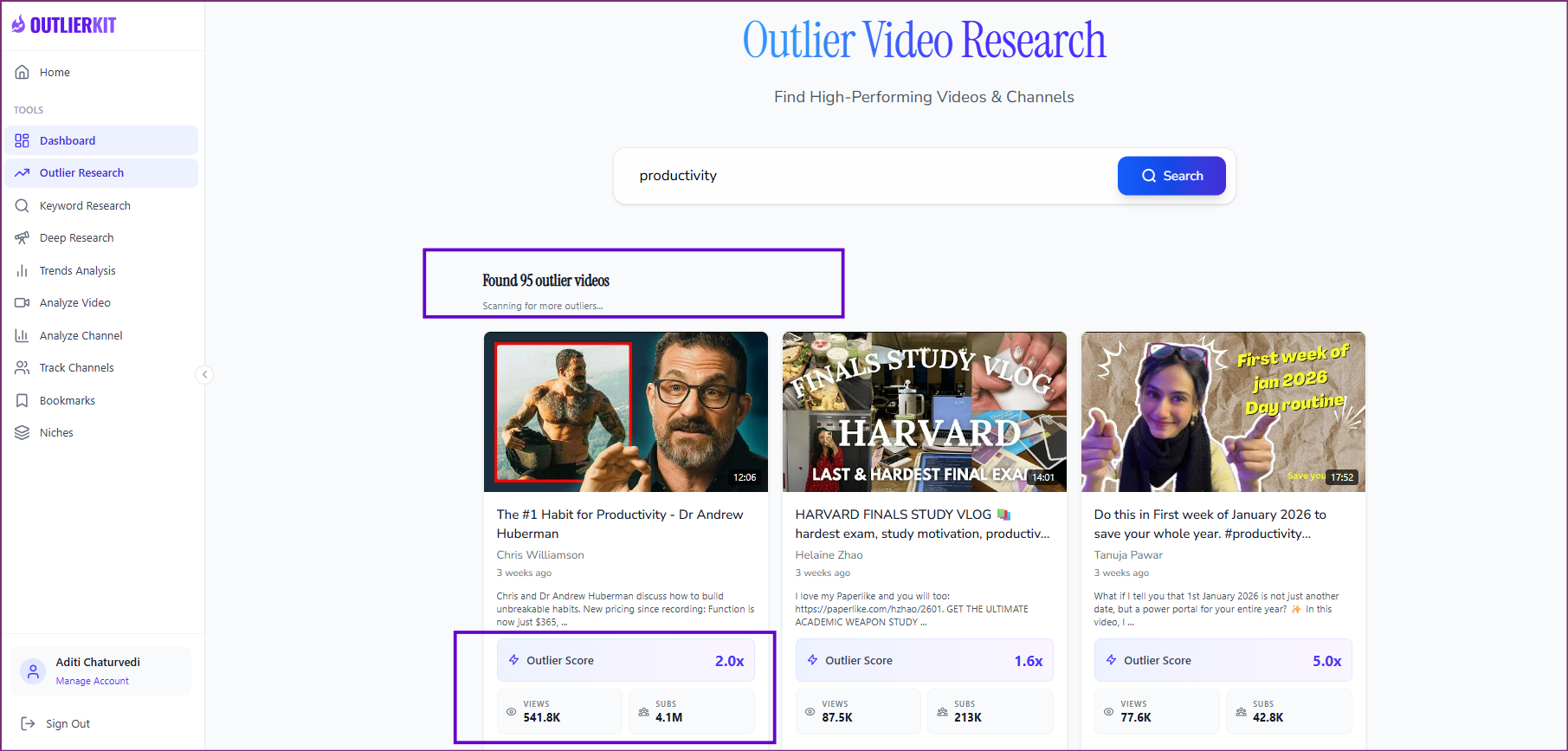
An outlier video is a video that performs substantially better than the channel's usual baseline. For example, a smaller channel that normally receives a few thousand views could have a video that suddenly reaches tens or hundreds of thousands of views.
That can be more interesting for research than simply looking at the biggest channels or videos in a niche.
OutlierKit's public documentation refers to signals including:
- Views relative to the channel baseline
- View velocity
- Sustained performance
- Engagement patterns
- Channel size
- Subscriber-to-view relationships
- Video age
- Topic and niche context
The exact formula used to calculate the Outlier Score is not publicly documented in enough detail to reproduce it independently. That means the score should be treated as a research signal, rather than a scientific measurement or prediction of future performance.
What the Outlier Score looks like
In OutlierKit's interface, results are presented as individual video cards with an Outlier Score alongside views and subscriber information.
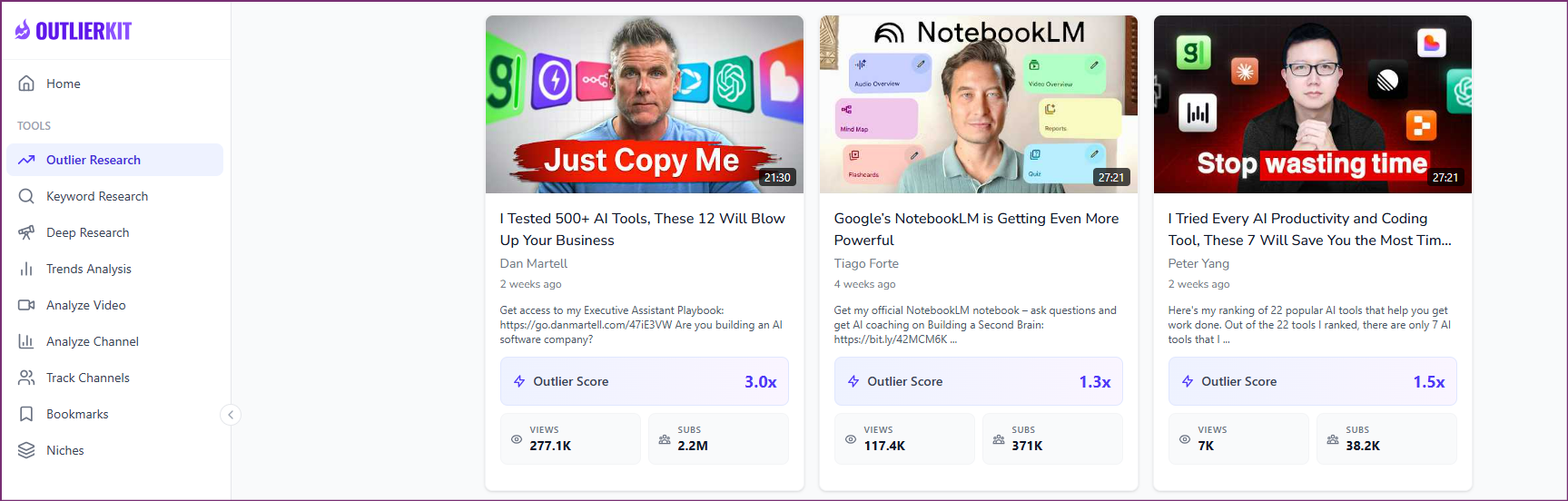
This is useful because the tool isn't simply asking:
Which video has the most views?
Instead, the research question becomes:
Which videos appear to be performing unusually well relative to the channels behind them?
That distinction can uncover smaller channels and unexpected topics that would otherwise be easy to overlook.
How should you use an outlier?
Finding an outlier is only the beginning.
A sensible workflow is to look for repeated patterns across multiple channels, rather than copying one successful video.
For example, you might discover several outliers around the same audience problem. You could then compare:
- Topic
- Title structure
- Format
- Hook
- Audience
- Channel size
- Publication date
- Search demand
- Competition
The goal is to identify an underlying content opportunity, then create something original for your own audience.
Key OutlierKit Features
Keyword Research
OutlierKit includes YouTube-focused keyword research designed to help identify potential opportunities, competition and commercial signals.
For creators, this can complement outlier research.
An outlier might tell you what has already worked, while keyword research can help investigate whether there is broader search or commercial potential around the topic.
The two approaches are therefore more useful together than separately.
Video Idea Scoring
Video Idea Scoring is designed to help evaluate potential topics before investing time into production.
This can be useful when you have several ideas but aren't sure which ones deserve deeper research.
However, a score should be treated as an input into the decision, not as a prediction that a video will perform well.
Single-Channel Competitor Analysis
You can analyze an individual YouTube channel to investigate its content and performance patterns.
This is useful when you already know a competitor or creator you want to study.
It can be a more focused alternative to jumping straight into broad niche research.
Deep Research
Deep Research combines multiple signals to generate more extensive research around a topic or niche.
OutlierKit describes it as combining elements such as audience psychology, trends, content gaps and data-backed video ideas. The current documentation lists Deep Research at 20 credits per query, although some public pages differ on which plans include it.
That plan-access discrepancy is worth checking before subscribing.
Script and Hook Analysis
OutlierKit can analyze scripts or transcripts to identify elements such as:
- Opening hooks
- Structure
- Topic progression
- Persuasive patterns
- Emotional elements
- Potential weaknesses
This could be useful when studying why certain videos are structured the way they are.
It is important, however, not to confuse correlation with causation. A particular hook appearing in a successful video does not prove that the hook caused the performance.
There are also conflicting public figures for the current credit cost of script analysis, so this should be verified in the live product before relying on a precise number.
Competitor Studio
From one channel to an entire niche
Competitor Studio is one of OutlierKit's more distinctive features.
The concept is straightforward. Start with a seed channel, then use it to explore the wider niche.
The documented workflow includes:
- 1. Enter a seed channel
- 2. Identify related or competing channels
- 3. Map the wider niche
- 4. Find outlier videos
- 5. Explore audience characteristics
- 6. Investigate sponsors and monetization
- 7. Identify content opportunities
OutlierKit describes Competitor Studio as a broader niche intelligence system covering areas such as niche mapping, outlier detection, audience psychographics, sponsor intelligence, monetization, comments and competitive analysis.
A full Competitor Studio analysis currently costs 50 credits, while a refresh costs 10 credits, and the feature is listed for Pro and Max users.
This is where OutlierKit starts to move beyond a traditional keyword research tool. Instead of analyzing one keyword or one competitor, you're attempting to build a broader picture of what is happening across an entire YouTube niche.
For agencies and consultants working across multiple clients, that broader perspective may be particularly useful.
OutlierKit Pricing
OutlierKit currently uses a credit-based pricing model.
| Plan | Monthly price | Annual price | Monthly credits |
|---|---|---|---|
| Hobby | $29/month | $199/year | 100 |
| Pro | $49/month | $299/year | 500 |
| Max | $199/month | $999/year | 2,000 |
The annual prices correspond to approximately $16.60/month for Hobby, $24.90/month for Pro and $83/month for Max when calculated over 12 months.
OutlierKit also currently advertises a limited free trial with 30 credits and no credit card required. There does not appear to be a permanent free plan.
One important pricing caveat
OutlierKit's public documentation is not completely consistent.
Older official pages list different monthly prices, while current pages show the $29, $49 and $199 monthly structure. The current September 2026 information appears more relevant, but the live checkout should be treated as the final authority before purchasing.
The same issue applies to some credit costs.
For that reason, we would not recommend treating every number published on older OutlierKit resource pages as current.
Understanding OutlierKit Credits
This is probably the most confusing part of the product.
You aren't simply paying for a fixed number of searches. Different research actions consume different amounts of your monthly allowance.
Some currently documented examples include:
- Deep Research: 20 credits
- Competitor Studio: 50 credits
- Competitor Studio refresh: 10 credits
- Script analysis: currently documented inconsistently
- Keyword and Outlier Research: current documentation contains conflicting figures
- API requests: costs vary by endpoint
The API also shares the same credit pool as the web application. That means API, MCP and dashboard usage can all consume credits from the same allowance.
This matters if you intend to use OutlierKit heavily.
For example, a Pro plan includes 500 monthly credits. Ten 50-credit Competitor Studio analyses would theoretically consume the entire monthly allowance before accounting for any other research.
That doesn't mean the plan is necessarily poor value. It simply means that how you use the platform matters as much as the headline subscription price.
What Can You Do With the Free Trial?
The current official information indicates:
- 30 free credits
- No credit card required
- No permanent free plan
- Enough credits to explore lower-cost research functions
- Competitor Studio normally requires 50 credits
That makes the free allowance useful for getting a feel for the research workflow, although it isn't enough to properly test every advanced feature.
The exact trial duration is less clear from the public documentation, so we would not state a specific number of days without verifying the current signup flow.
Who Can Benefit From OutlierKit?
YouTube creators
Creators can use OutlierKit to research potential topics before production, investigate successful videos, analyze hooks and scripts, and explore competitors.
The platform is therefore most relevant before you make the video, rather than during editing or publishing.
Small YouTube channels
Small channels may find external niche research particularly useful because they don't yet have enough historical data on their own channel.
The caveat is important, though. A video that works for a channel with millions of subscribers may not translate directly to a channel with a few thousand.
Comparing channels with similar audiences and formats is therefore more useful than simply copying the largest outlier you find.
Freelancers and consultants
Freelance content strategists and consultants could use OutlierKit as a research layer for client strategy.
Potential applications include:
- Competitor research
- Content strategy
- Niche research
- Audience questions
- Content-gap analysis
- YouTube strategy reports
SaaS companies
A SaaS business could use the platform to investigate videos around:
- Competitor alternatives
- Product categories
- How-to searches
- Customer problems
- Educational topics
- YouTube acquisition opportunities
It can help inform a content plan, but it doesn't replace customer research or product-market research.
Affiliate marketers
Affiliate marketers may find the combination of keyword research, outlier detection and competitor analysis useful when researching commercial YouTube topics.
But estimated RPM or apparent commercial opportunity shouldn't be treated as evidence that a topic will generate affiliate revenue. Actual affiliate availability, audience fit and conversion potential still need to be validated.
Agencies
Agencies are one of the more obvious use cases for the higher-tier features.
Multi-channel research, Competitor Studio, API access and MCP can become more useful when research is performed repeatedly across multiple clients and niches.
A Practical OutlierKit Workflow
Here's how a creator could realistically use the platform.
1. Start with a niche
Use keyword or niche research to understand the market.
2. Find a relevant channel
Use an established channel as a starting point for competitor research.
3. Look for outliers
Find videos that perform unusually well compared with their channels.
4. Look for repeated patterns
Don't stop at one video. Compare multiple outliers across different channels.
5. Validate the topic
Check search demand, competition, audience fit and current relevance.
6. Study the audience
Use comments, audience signals and research features to understand the underlying problem.
7. Analyze hooks and scripts
Study how successful videos introduce and develop the topic.
8. Create something original
Use the research to inform your own content rather than reproducing another creator's video.
This last step is important.
OutlierKit can show you what appears to be working. It cannot tell you exactly why it worked or guarantee that you can reproduce the result.
OutlierKit vs Other YouTube Tools
OutlierKit overlaps with several established YouTube tools, but its positioning is somewhat different.
| Tool | Primary focus | Outlier research | Keyword research | Niche research | Channel management |
|---|---|---|---|---|---|
| OutlierKit | Niche intelligence and content research | Core feature | Yes | Yes | No |
| vidIQ | YouTube SEO and optimization | Some | Yes | Some | More creator-focused |
| TubeBuddy | YouTube optimization and workflow | Limited | Yes | Limited | Yes |
| 1of10 | Outlier and video research | Strong | Some | Yes | No |
| Viewstats | Channel statistics and research | Strong | Limited | Some | No |
| YouTube Studio | First-party channel analytics | No | Limited | No | Yes |
The distinction is worth keeping in mind.
If your main goal is managing your own channel, YouTube Studio remains fundamentally different from OutlierKit.
If you're looking for broad SEO and channel optimization features, tools such as vidIQ or TubeBuddy have a different emphasis.
OutlierKit is more specifically centered on researching what is happening across a niche and finding patterns worth investigating.
Pros and Cons
Pros
- Strong focus on outlier research
- Niche-wide competitive analysis
- Competitor Studio
- Keyword and content research in one platform
- Audience and comment intelligence
- Script and hook analysis
- API and MCP access
- Useful for agencies and content strategists
- Core research can work with public YouTube data
Cons
- Credit system can be difficult to understand
- Some public documentation contains conflicting information
- Exact outlier methodology is not fully disclosed
- No video editing or publishing workflow
- Advanced research requires higher-tier plans
- Independent review evidence is still relatively limited
- Results depend on the quality and availability of public YouTube data
The independent evidence base is worth noting. Product Hunt currently shows a small number of reviews, while Capterra has no user reviews listed. That isn't evidence that the product is poor or strong, but it does mean there is less independent review data available than for more established software products.
Who Should Consider OutlierKit?
OutlierKit may be a good fit if you
- Publish YouTube content regularly
- Need a repeatable research process
- Run a small channel with limited historical data
- Work as a YouTube content strategist
- Manage YouTube research for clients
- Run an agency
- Use YouTube for SaaS or business acquisition
- Create affiliate or commercial content
- Want access to research through API or MCP
It may be less suitable if you
- Want a free unlimited YouTube tool
- Mainly need video editing
- Want thumbnail creation or A/B testing
- Primarily need your own private YouTube Studio analytics
- Dislike credit-based pricing
- Publish very occasionally
- Work in a niche with very little public YouTube data
Is OutlierKit Worth It?
OutlierKit's value depends heavily on how much YouTube research you actually do.
Its strongest proposition isn't necessarily any one feature. It's the combination of outlier discovery, keyword research, competitor analysis, audience signals, content research and script analysis within one workflow.
For a creator who regularly researches new content ideas, that can potentially replace a considerable amount of manual research.
The main consideration is the credit system. Heavy use of Competitor Studio, Deep Research, script analysis or API features can consume credits quickly, while the public documentation currently contains some inconsistencies around individual credit costs.
For occasional creators, the subscription may therefore be harder to justify.
For creators, consultants or agencies who treat YouTube research as a recurring part of their workflow, the broader research capabilities are more relevant.
The best way to assess the fit is to use the current free allowance first, then look at how quickly your actual research workflow consumes credits.
Bottom line: OutlierKit is best understood as a YouTube research and niche intelligence platform, not a complete YouTube growth suite. Its most interesting feature is the ability to find unusual performance patterns and investigate what may sit behind them. The more consistently you use that research, the more relevant the platform becomes.
Explore OutlierKit
Frequently Asked Questions
What is OutlierKit used for?
OutlierKit is used for YouTube research, niche research, competitor analysis, outlier video discovery, keyword research, audience research and content ideation.
Does OutlierKit require a YouTube channel?
Core research can be performed using public YouTube channel information, so owning a channel does not appear to be required for the basic research workflow. Some connected-channel functionality is available on higher-tier plans.
How much does OutlierKit cost?
Current public pricing lists Hobby at $29/month, Pro at $49/month and Max at $199/month. Annual plans are listed at $199, $299 and $999 respectively.
What are OutlierKit credits?
Credits are the usage currency for research actions. Different features consume different amounts, meaning the number of credits included in a plan does not correspond directly to the number of searches you can perform.
What is Competitor Studio?
Competitor Studio starts with a seed YouTube channel and maps related channels and broader niche intelligence, including outliers, audience signals, sponsors, monetization and content opportunities. A documented run costs 50 credits.
Is OutlierKit useful for small YouTube channels?
It can be useful because small channels often have limited historical data of their own. External niche research can provide additional context, although results from much larger channels should not automatically be assumed to transfer to a smaller audience.
Final Editorial Note
OutlierKit has a relatively clear proposition: research what is working across YouTube before deciding what to create.
Its outlier-based approach gives it a distinct research angle, while features such as Competitor Studio, keyword research, audience analysis and Deep Research expand that workflow.
The main things to investigate before committing to a paid plan are credit consumption, the exact feature availability of each plan and the current pricing shown at checkout. Several public OutlierKit pages currently contain conflicting information, so those details should be treated with some caution.
For ConfidencePilot, that transparency is important. We would rather flag an uncertainty than present an apparently precise number that the product documentation itself does not consistently support.